[JSP·Servlet] Ajax(비동기 통신)로 구현하는 회원 중복 확인과 파일 업로드
목차
Ajax(Asynchronous JavaScript and XML)란?
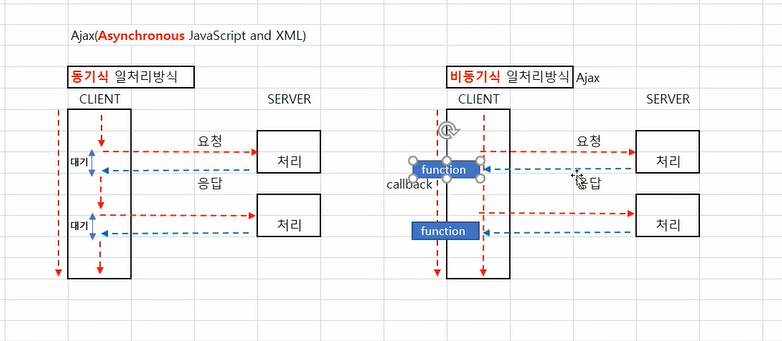
비동기(Asynchronous) 방식으로 서버와 데이터를 주고받는 기술이다.
| 방식 | 설명 |
|---|---|
| 동기식(Synchronous) | 이전 작업이 완료되어야 다음 작업 진행 |
| 비동기식(Asynchronous) | 작업 진행 중에도 다른 요청·응답이 가능 |
Ajax를 이용하여 개발을 손쉽게 할 수 있도록 미리 여러 가지 기능을 포함해 놓은 개발 환경을 Ajax 프레임워크라고 한다. 그 중에서도 현재 가장 널리 사용되고 있는 Ajax 프레임워크는 jQuery이다.
Ajax로 서버에 요청하면 데이터가 URL에 담겨 전달된다.
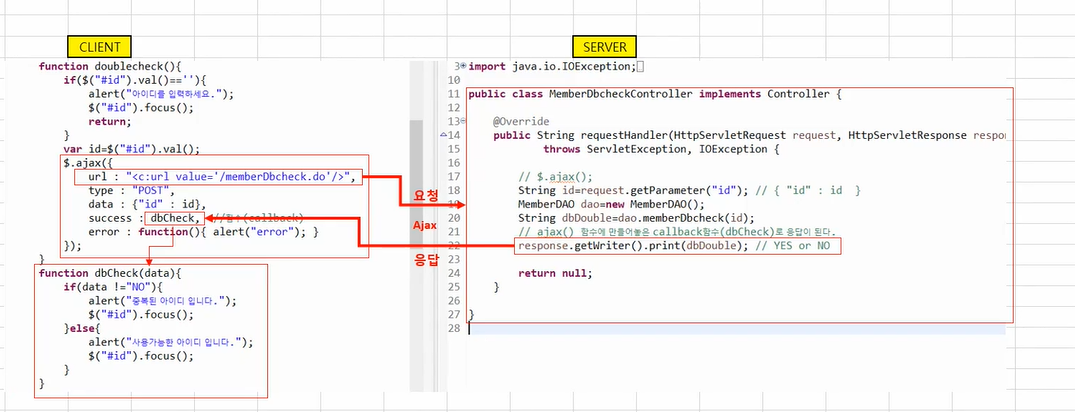
MVC에서의 Ajax 흐름
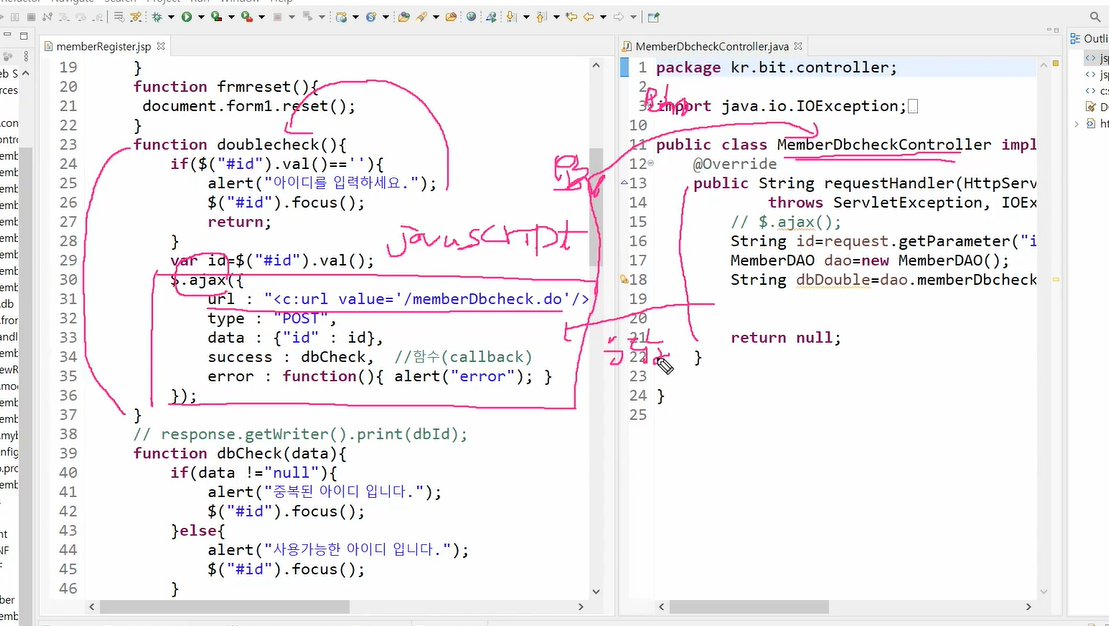
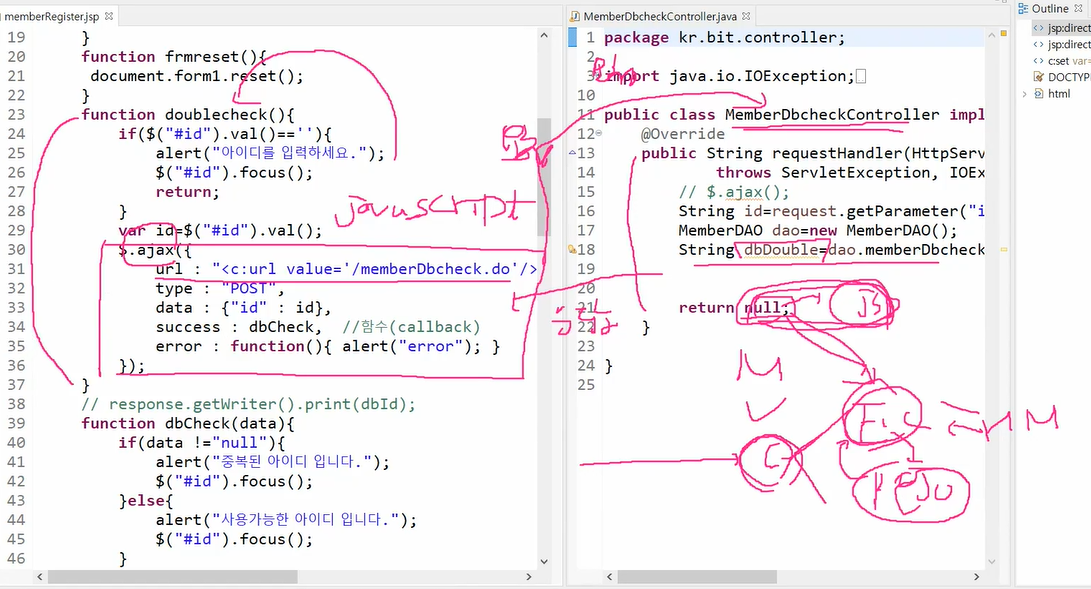
컨트롤러는 FrontController와 POJO 두 부분으로 나뉜다.
- 클라이언트 요청 → FrontController가 핸들러 매핑 거침
- FrontController → POJO 호출
- POJO → 다시 FrontController로 반환
- FrontController → JSP 경로 생성 후 포워딩
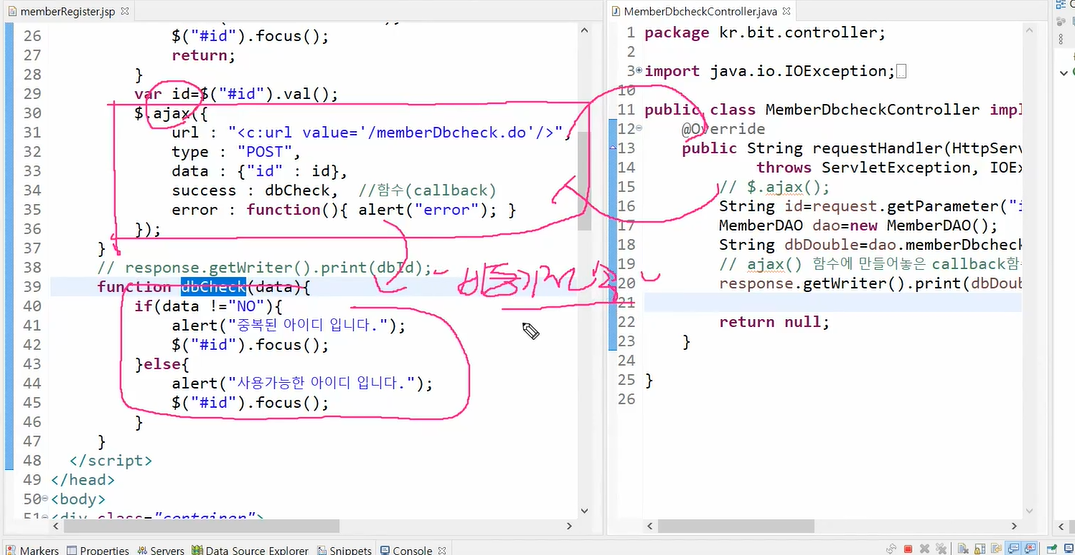
클라이언트가 서버에 아이디 중복 확인을 요청할 때, 자바스크립트의 Ajax 방식으로 서버에 요청하고 응답 결과를 화면에 출력한다.
파일 업로드 구현
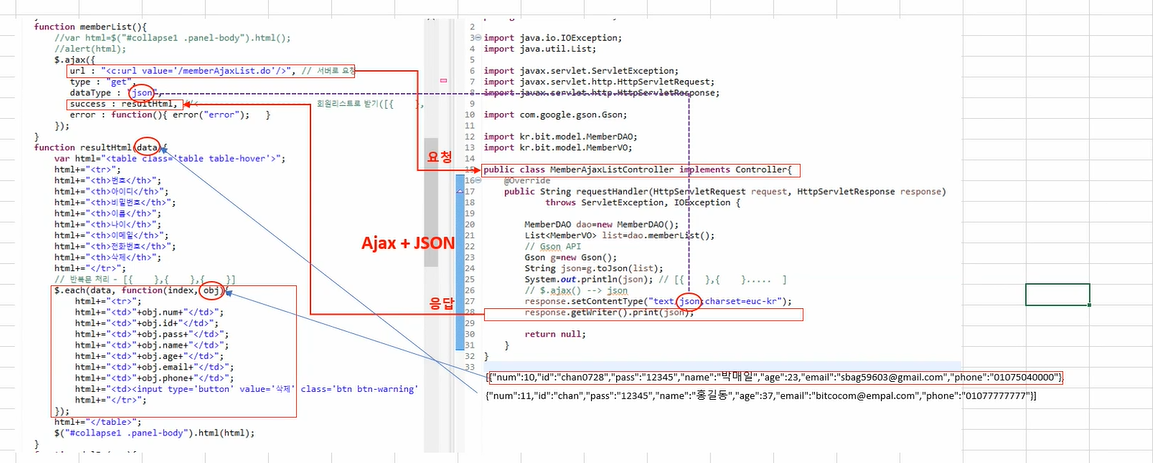
하나의 파일 객체가 obj에 들어가게 된다.
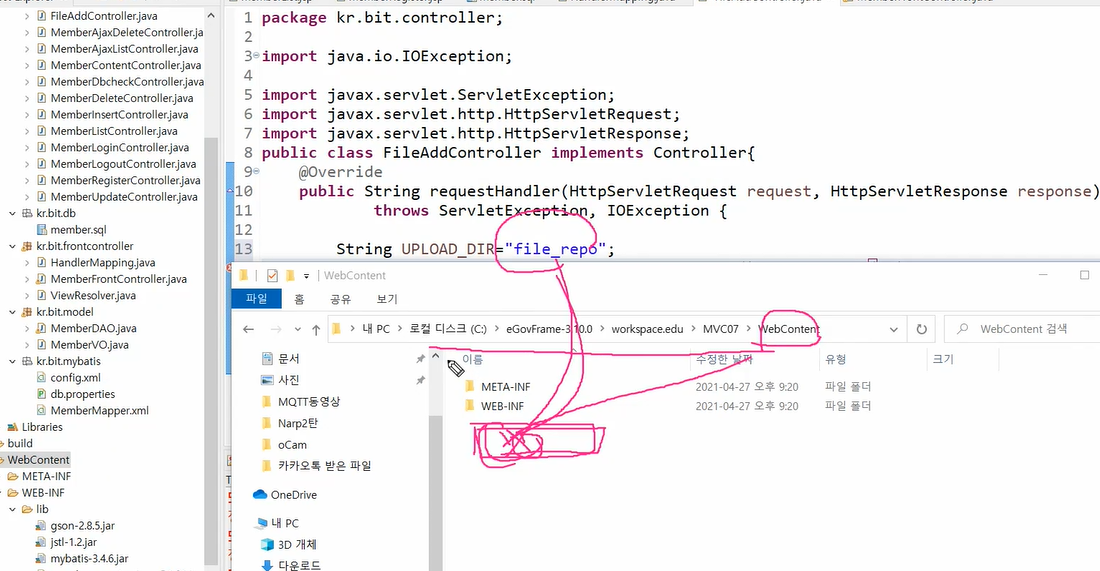
이 디렉토리가 업로드 대상 경로이며, 아직 생성되지 않은 상태이다.
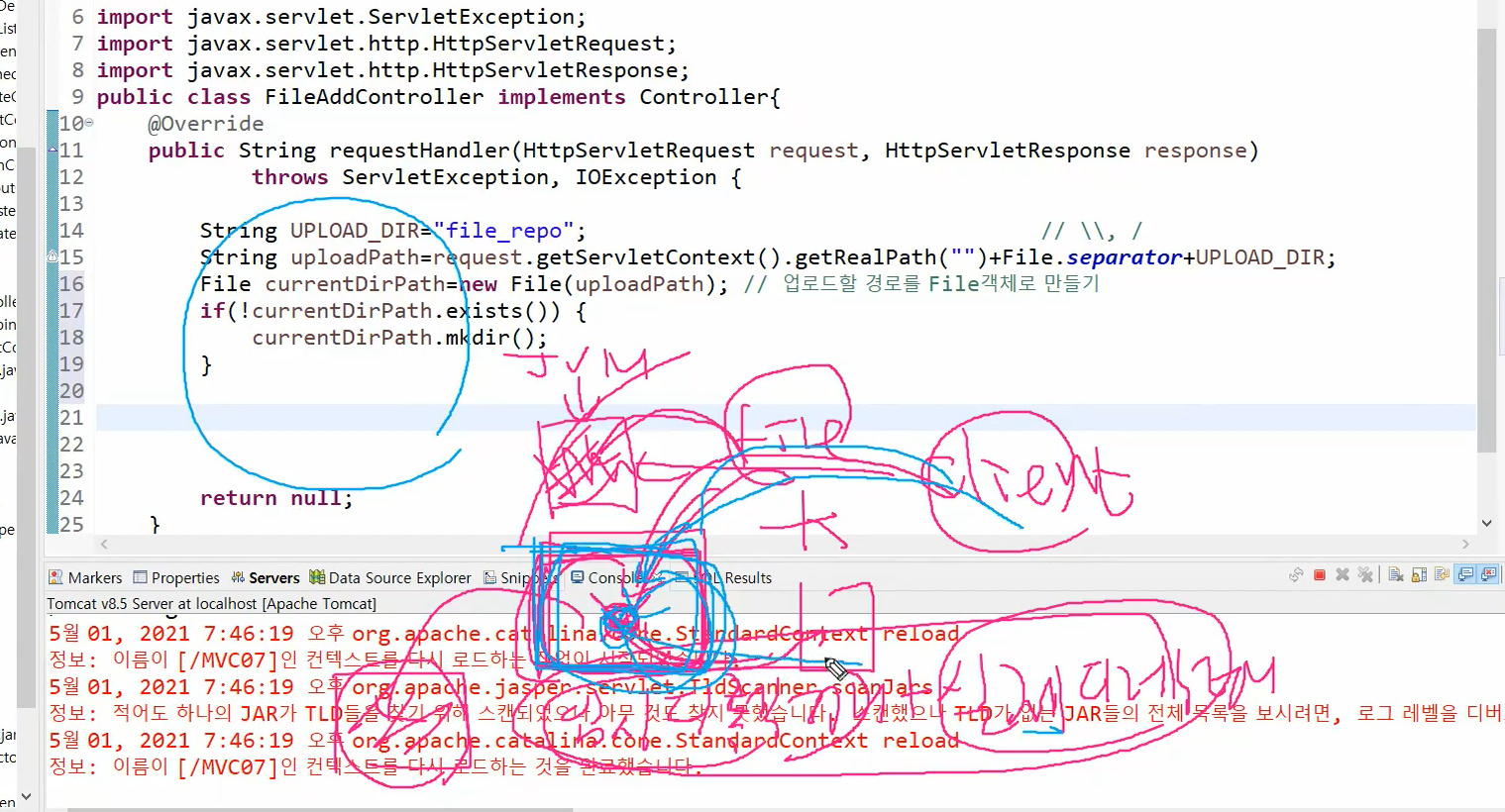
파일을 메모리에 직접 저장하면 부담이 크기 때문에, 임시 디렉토리를 만들고 거기에 저장한다.
FileAddController — 파일 업로드 처리 코드
package kr.bit.controller;

import java.io.File;
import java.io.IOException;
import java.util.List;

import javax.servlet.ServletException;
import javax.servlet.http.HttpServletRequest;
import javax.servlet.http.HttpServletResponse;

import org.apache.commons.fileupload.FileItem;
import org.apache.commons.fileupload.disk.DiskFileItemFactory;
import org.apache.commons.fileupload.servlet.ServletFileUpload;

public class FileAddController implements Controller {

    @Override
    public String requestHandler(HttpServletRequest request, HttpServletResponse response)
            throws ServletException, IOException {

        String UPLOAD_DIR = "file_repo";                                   // \\, /
        String uploadPath = request.getServletContext().getRealPath("") + File.separator + UPLOAD_DIR;
        File currentDirPath = new File(uploadPath); // 업로드할 경로를 File 객체로 생성
        if (!currentDirPath.exists()) {
            currentDirPath.mkdir();
        }

        // 파일 업로드 시 필요한 API — commons-fileupload, commons-io
        DiskFileItemFactory factory = new DiskFileItemFactory();
        factory.setRepository(currentDirPath);
        factory.setSizeThreshold(1024 * 1024);

        String fileName = null;

        ServletFileUpload upload = new ServletFileUpload(factory);
        try {     // items --> FileItem[], FileItem[], FileItem[]
            List<FileItem> items = upload.parseRequest(request); // request 안에 여러 파일이 업로드된 경우 처리
            for (int i = 0; i < items.size(); i++) {
                FileItem fileItem = items.get(i);
                if (fileItem.isFormField()) { // 일반 폼 필드인 경우
                    System.out.println(fileItem.getFieldName() + "=" + fileItem.getString("utf-8"));
                } else { // 파일인 경우
                    if (fileItem.getSize() > 0) {
                        int idx = fileItem.getName().lastIndexOf("\\"); // \\(Windows), /(Linux)
                        // 운영 체제에 따라 마지막 구분자 인덱스 추출
                        if (idx == -1) {
                            idx = fileItem.getName().lastIndexOf("/");
                        }
                        fileName = fileItem.getName().substring(idx + 1); // 파일 이름 추출
                        File uploadFile = new File(currentDirPath + "\\" + fileName);
                        // 파일명 중복 체크
                        if (uploadFile.exists()) {
                            fileName = System.currentTimeMillis() + "_" + fileName;
                            uploadFile = new File(currentDirPath + "\\" + fileName);
                        }
                        fileItem.write(uploadFile); // 임시 경로 → 최종 경로로 파일 쓰기
                    }
                }
            } //_for_
        } catch (Exception e) {
            e.printStackTrace();
        }

        // $.ajax()쪽으로 업로드된 최종 파일 이름 전송
        response.setContentType("text/html;charset=euc-kr");
        response.getWriter().print(fileName);
        return null;
    }
}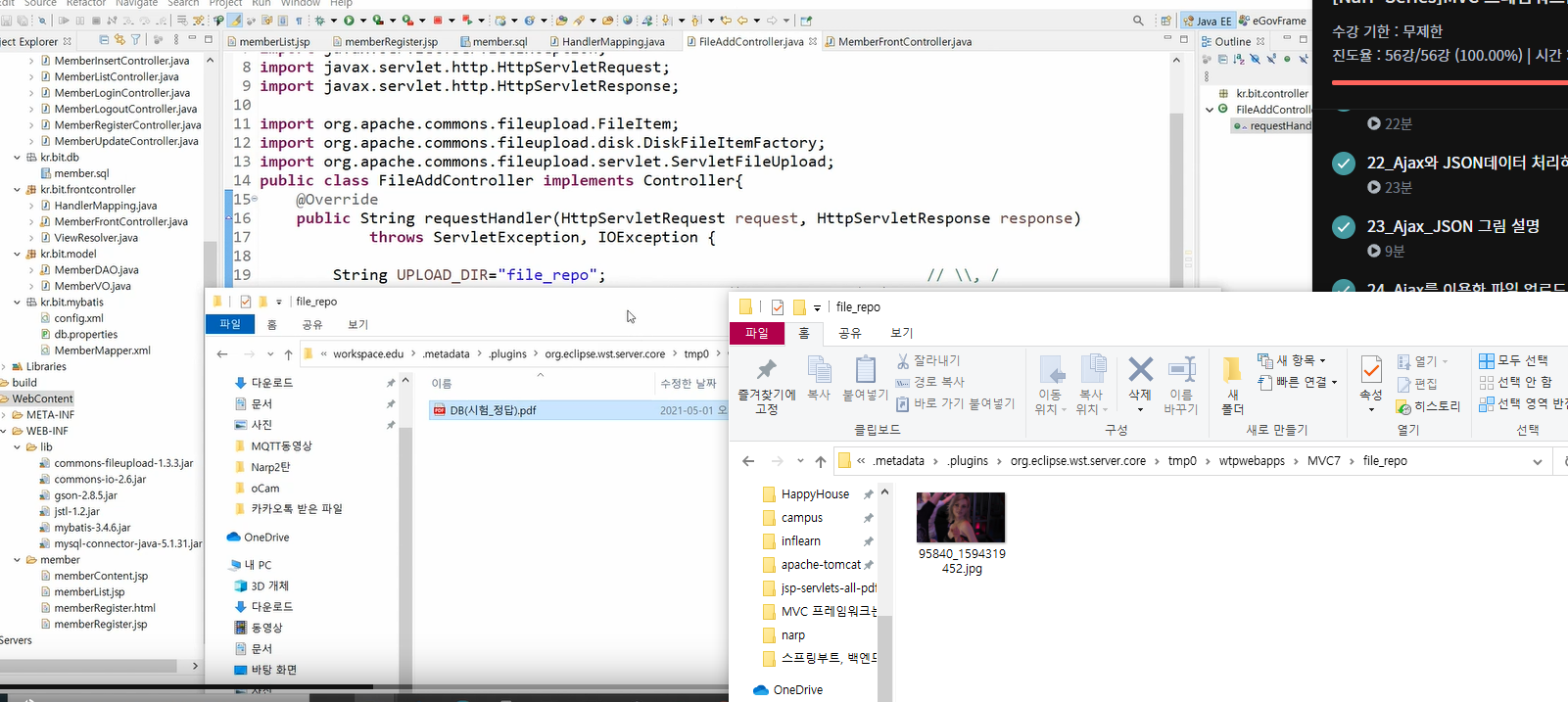
파일이 직접 해당 폴더에 저장된다.
회원가입 폼 — 파일 첨부 포함
<div class="panel-body">
     <form id="form1" name="form1" class="form-horizontal" method="post">
      <div class="form-group">
        <label class="control-label col-sm-2" for="id">아이디:</label>
        <div class="col-sm-10">
          <table>
            <tr>
              <td><input type="text" class="form-control" id="id" name="id" placeholder="아이디를 입력하세요"></td>
              <td><input type="button" value="중복체크" onclick="doublecheck()" class="btn btn-warning"></td>
            </tr>
          </table>
        </div>
      </div>
      <div class="form-group">
        <label class="control-label col-sm-2" for="pass">비밀번호:</label>
        <div class="col-sm-10">
          <input type="password" class="form-control" id="pass" name="pass" placeholder="비밀번호를 입력하세요" style="width: 30%">
        </div>
      </div>
       <div class="form-group">
        <label class="control-label col-sm-2" for="name">이름:</label>
        <div class="col-sm-10">
          <input type="text" class="form-control" id="name" name="name" placeholder="이름을 입력하세요" style="width: 30%">
        </div>
      </div>
        <div class="form-group">
        <label class="control-label col-sm-2" for="age">나이:</label>
        <div class="col-sm-10">
          <input type="text" class="form-control" id="age" name="age" placeholder="나이입력" style="width: 10%">
        </div>
      </div>
        <div class="form-group">
        <label class="control-label col-sm-2" for="email">이메일:</label>
        <div class="col-sm-10">
          <input type="text" class="form-control" id="email" name="email" placeholder="이메일을 입력하세요" style="width: 30%">
        </div>
      </div>
        <div class="form-group">
        <label class="control-label col-sm-2" for="pass">전화번호:</label>
        <div class="col-sm-10">
          <input type="text" class="form-control" id="phone" name="phone" placeholder="전화번호를 입력하세요" style="width: 30%">
        </div>
      </div>
      <div class="form-group">
        <label class="control-label col-sm-2" for="">첨부파일:</label>
        <div class="col-sm-10">
          <input type="file" class="control-label" id="file" name="file">
        </div>
      </div>
이 폼의 파일 업로드와 서버 저장은 분리해서 처리한다. 업로드 완료 후 서버에 저장한다.