[Java] java 배열
목차
20. 자료를 순차적으로 한꺼번에 관리하는 방법 - 배열(array)
배열이란?
- 동일한 자료형의 순차적 자료 구조다.
- 인덱스 연산자
[]를 이용하여 빠른 참조가 가능하다. - 물리적 위치와 논리적 위치가 동일하다.
- 배열의 순서(인덱스)는 0부터 시작한다.
- 자바에서는 객체 배열을 구현한
ArrayList를 많이 활용한다.
배열 선언과 초기화
배열 선언하기
int[] arr1 = new int[10];
int arr2[] = new int[10];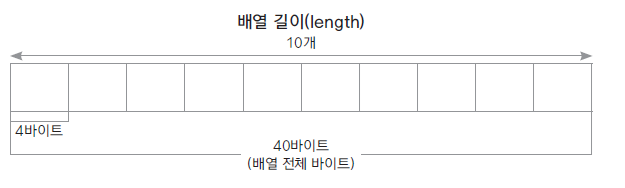
배열 초기화하기
배열은 선언과 동시에 자료형에 따라 초기화된다. (정수는 0, 실수는 0.0, 객체는 null) 필요에 따라 초기값을 지정할 수 있다.
int[] numbers = new int[] {10, 20, 30};  //개수 생략해야 함

int[] numbers = {10, 20, 30};            // new int[]  생략 가능

int[] ids;
ids = new int[] {10, 20, 30};            // 선언후 배열을 생성하는 경우는 new int[] 생략할 수 없음
배열 사용하기
[]인덱스 연산자를 활용한다. 배열 요소가 저장된 메모리의 위치를 연산하여 찾아 준다.- 배열을 이용하여 합 구하기:
int[] arr = new int[10];
int total = 0;


for(int i=0, num=1; i< arr.length; i++, num++) {
	arr[i] = num;
}

for( int i =0; i<arr.length; i++) {
	total += arr[i];
}
System.out.println(total);
배열의 길이와 요소의 개수는 동일하지 않습니다
- 배열을 선언하면 개수만큼 메모리가 할당되지만, 실제 요소(데이터)가 없는 경우도 있다.
- 배열의
length속성은 배열의 전체 개수를 반환하므로, 실제 채워진 요소의 개수와는 다를 수 있다.
length를 그대로 활용하여 오류가 나는 경우:
double[] dArr = new double[5];

dArr[0] = 1.1;
dArr[1] = 2.1;
dArr[2] = 3.1;

double mtotal = 1;
for(int i = 0; i< dArr.length; i++) {
	mtotal *= dArr[i];
}

System.out.println(mtotal);
요소의 개수에 대한 변수(count)를 따로 유지하여 해결:
double[] dArr = new double[5];
int count = 0;
dArr[0] = 1.1; count++;
dArr[1] = 2.1; count++;
dArr[2] = 3.1; count++;

double mtotal = 1;
for(int i = 0; i< count; i++) {
	mtotal *= dArr[i];
}

System.out.println(mtotal);
문자 배열을 만들어 A-Z까지 저장하고 다시 출력하기
public class CharArrayTest {

	public static void main(String[] args) {

		char[] alpahbets = new char[26];
		char ch = 'A';

		for(int i = 0; i<alpahbets.length; i++) {

			alpahbets[i] = ch++;
		}

		for(int i = 0; i<alpahbets.length; i++) {
			System.out.println(alpahbets[i] +","+ (int)alpahbets[i]);
		}
	}

}
향상된 for문 사용하기
배열의 n개 요소를 0부터 n-1까지 순차적으로 순회할 때 간단하게 사용할 수 있다.
for( 변수 : 배열) {

}
public class CharArrayTest {
public static void main(String[] args) {
char[] alpahbets = new char[26];
char ch = 'A';
for(int i = 0; i<alpahbets.length; i++) {
alpahbets[i] = ch++;
}
for(char alpha : alpahbets) {
System.out.println(alpha +","+ (int)alpha);
}
}
}21. 객체 배열 사용하기
객체 배열 선언과 구현
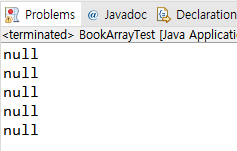
- 기본 자료형 배열은 선언과 동시에 배열의 크기만큼 메모리가 할당되지만, 객체 배열은 요소가 되는 객체의 주소가 들어갈 메모리(4바이트 또는 8바이트)만 할당되고(null), 각 요소 객체는 따로 생성하여 저장해야 한다.
예를 들어 Person 객체 배열 5개를 만들면 Person 5개가 생기는 게 아니라, Person 5개의 주소를 담을 방 5개가 생긴다고 이해하면 된다.

Book.java
public class Book {

	private String title;
	private String author;

	public Book() {}

	public Book(String title, String author) {
		this.title = title;
		this.author = author;
	}

	public String getTitle() {
		return title;
	}

	public void setTitle(String title) {
		this.title = title;
	}

	public String getAuthor() {
		return author;
	}

	public void setAuthor(String author) {
		this.author = author;
	}

	public void showBookInfo() {
		System.out.println(title + "," +author);
	}
}
BookArrayTest.java
public class BookArrayTest {

	public static void main(String[] args) {

		Book[] library = new Book[5];

		for(int i =0; i<library.length; i++) {
			System.out.println(library[i]);
		}
	}
}
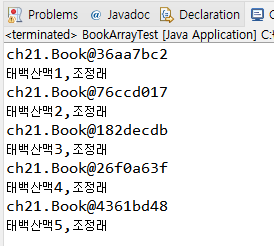
객체 배열은 new로 배열을 만든다고 요소까지 생성되는 것이 아니라, 각 객체를 미리 만들어 두어야 한다.
객체를 생성하여 각 배열의 요소로 저장하기:
public class BookArrayTest {

	public static void main(String[] args) {

		Book[] library = new Book[5];

		library[0] = new Book("태백산맥1", "조정래");
		library[1] = new Book("태백산맥2", "조정래");
		library[2] = new Book("태백산맥3", "조정래");
		library[3] = new Book("태백산맥4", "조정래");
		library[4] = new Book("태백산맥5", "조정래");

		for(int i =0; i<library.length; i++) {
			System.out.println(library[i]);
			library[i].showBookInfo();
		}
	}
}
객체 배열 복사하기
System.arraycopy(src, srcPos, dest, destPos, length)는 자바에서 제공되는 배열 복사 메서드다.
얕은 복사 (shallow copy)
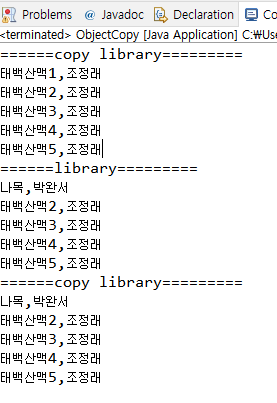
- 객체 주소만 복사되어, 한쪽 배열의 요소를 수정하면 다른 쪽도 함께 수정된다.
- 즉, 두 배열이 같은 객체를 가리킨다.
public class ObjectCopy {

	public static void main(String[] args) {

		Book[] library = new Book[5];
		Book[] copyLibaray = new Book[5];

		library[0] = new Book("태백산맥1", "조정래");
		library[1] = new Book("태백산맥2", "조정래");
		library[2] = new Book("태백산맥3", "조정래");
		library[3] = new Book("태백산맥4", "조정래");
		library[4] = new Book("태백산맥5", "조정래");

		System.arraycopy(library, 0, copyLibaray, 0, 5);

		System.out.println("======copy library=========");
		for( Book book : copyLibaray ) {
			book.showBookInfo();
		}

		library[0].setTitle("나목");
		library[0].setAuthor("박완서");

		System.out.println("======library=========");
		for( Book book : library) {
			book.showBookInfo();
		}

		System.out.println("======copy library=========");

		for( Book book : copyLibaray) {
			book.showBookInfo();
		}
	}
}
System.arraycopy(library, 0, copyLibaray, 0, 5);는 원본(library)의 0번부터 5개를, 대상(copyLibaray)의 0번 위치부터 복사하라는 의미다.
깊은 복사 (deep copy)
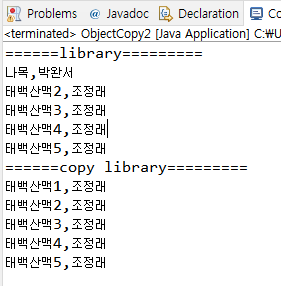
- 각각의 객체를 새로 생성하여 그 값을 복사함으로써, 배열이 서로 다른 객체를 가리키도록 한다.
- 따라서 한쪽을 수정해도 다른 쪽은 영향을 받지 않는다.
public class ObjectCopy2 {

	public static void main(String[] args) {

		Book[] library = new Book[5];
		Book[] copyLibaray = new Book[5];

		library[0] = new Book("태백산맥1", "조정래");
		library[1] = new Book("태백산맥2", "조정래");
		library[2] = new Book("태백산맥3", "조정래");
		library[3] = new Book("태백산맥4", "조정래");
		library[4] = new Book("태백산맥5", "조정래");

		copyLibaray[0] = new Book();
		copyLibaray[1] = new Book();
		copyLibaray[2] = new Book();
		copyLibaray[3] = new Book();
		copyLibaray[4] = new Book();

		for(int i = 0; i< library.length; i++) {
			copyLibaray[i].setTitle(library[i].getTitle());
			copyLibaray[i].setAuthor(library[i].getAuthor());
		}


		library[0].setTitle("나목");
		library[0].setAuthor("박완서");

		System.out.println("======library=========");
		for( Book book : library) {
			book.showBookInfo();
		}

		System.out.println("======copy library=========");
		for( Book book : copyLibaray) {
			book.showBookInfo();
		}
	}
}
같은 객체를 가리키게 할 목적이라면 굳이 새 인스턴스를 만들면 오버헤드다. 반면, 인스턴스 값을 복사해 독립된 객체를 새로 두려면 깊은 복사로 객체를 새로 만들면 된다.
22. 2차원 배열 사용하기
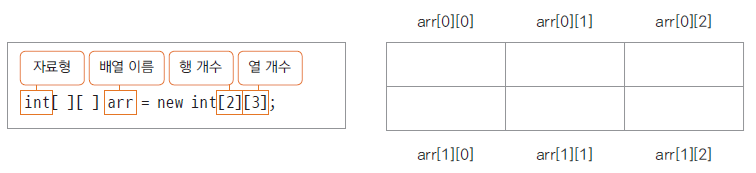
다차원 배열
- 2차원 이상으로 구현된 배열이다.
- 평면(2차원 배열)이나 공간(3차원 배열)을 활용한 프로그램을 구현할 수 있다.
2차원 배열 예제
23. 객체 배열을 구현한 클래스 ArrayList
java.util 패키지에서 제공되는 ArrayList
- 기존의 배열은 길이를 미리 정해야 하며, 요소의 개수가 길이보다 커지면 배열을 재할당하고 복사해야 했다.
- 또한 요소를 추가하거나 삭제하면 다른 요소들의 이동을 직접 구현해야 했다.
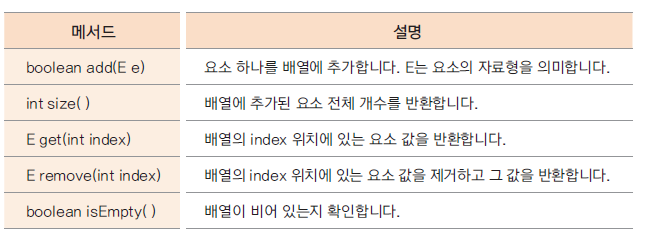
ArrayList는 객체 배열을 좀 더 효율적으로 관리하기 위해 자바에서 제공하는 클래스다.- 이미 많은 메서드가 최적의 알고리즘으로 구현되어 있어, 사용 방법만 익히면 유용하게 쓸 수 있다.
ArrayList의 주요 메서드
ArrayList를 활용한 간단한 예제
import java.util.ArrayList;
import ch21.Book;

public class ArrayListTest {

	public static void main(String[] args) {

		ArrayList<Book> library = new ArrayList<Book>();

		library.add(new Book("태백산맥1", "조정래"));
		library.add(new Book("태백산맥2", "조정래"));
		library.add(new Book("태백산맥3", "조정래"));
		library.add(new Book("태백산맥4", "조정래"));
		library.add(new Book("태백산맥5", "조정래"));

		for(int i =0; i<library.size(); i++) {
			library.get(i).showBookInfo();
		}
	}
}
24. ArrayList를 활용한 간단한 성적 산출 프로그램
예제 시나리오
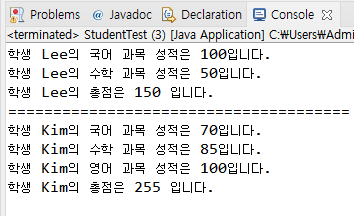
1001학번 Lee와 1002학번 Kim, 두 학생이 있습니다.
Lee 학생은 국어와 수학 2과목을 수강했고, Kim 학생은 국어, 수학, 영어 3 과목을 수강하였습니다.
Lee 학생은 국어 100점, 수학 50점입니다.
Kim 학생은 국어 70점, 수학 85점, 영어 100점입니다.
Student와 Subject 클래스를 만들고 ArrayList를 활용하여 두 학생의 과목 성적과 총점을 출력하세요
Student 클래스
import java.util.ArrayList;

public class Student {

	int studentID;
	String studentName;
	ArrayList<Subject> subjectList;

	public Student(int studentID, String studentName){
		this.studentID = studentID;
		this.studentName = studentName;

		subjectList = new ArrayList<Subject>();
	}

	public void addSubject(String name, int score){
		Subject subject = new Subject();

		subject.setName(name);
		subject.setScorePoint(score);
		subjectList.add(subject);
	}

	public void showStudentInfo()
	{
		int total = 0;

		for(Subject s : subjectList){

			total += s.getScorePoint();
			System.out.println("학생 " + studentName + "의 " + s.getName() + " 과목 성적은 " +
			        s.getScorePoint() + "입니다.");
		}

		System.out.println("학생 " + studentName + "의 총점은 " + total + " 입니다.");
	}
}
Subject 클래스
public class Subject {

	private String name;
	private int scorePoint;

	public String getName() {
		return name;
	}
	public void setName(String name) {
		this.name = name;
	}
	public int getScorePoint() {
		return scorePoint;
	}
	public void setScorePoint(int scorePoint) {
		this.scorePoint = scorePoint;
	}
}
실행하기
public class StudentTest {

	public static void main(String[] args) {
		Student studentLee = new Student(1001, "Lee");

		studentLee.addSubject("국어", 100);
		studentLee.addSubject("수학", 50);

		Student studentKim = new Student(1002, "Kim");

		studentKim.addSubject("국어", 70);
		studentKim.addSubject("수학", 85);
		studentKim.addSubject("영어", 100);

		studentLee.showStudentInfo();
		System.out.println("======================================");
		studentKim.showStudentInfo();
	}
}